Troubleshooting
BitMEX login problems, decoded one error at a time
Most login failures are not outages. They are a lookalike domain, a clock that drifted by ninety seconds, or a compliance rule doing exactly what it was written to do. Here is how to tell which one you are looking at — and how to sign up in a way that stops the expensive failures from happening at all.
Check the address bar before you check anything else
Credential phishing against exchange users has one reliable shape: a page that is pixel-identical to the real login, served from a domain that differs by a hyphen, a doubled letter or an unusual suffix. It accepts your password, forwards it to the real site, then asks for your two-factor code and forwards that too. From your side, the login simply "fails" — and by then the attacker is inside.
So before diagnosing anything, look at the URL. Then close the tab, open a new one, and type the address yourself. Bookmark the result and use only the bookmark from then on. This single habit defeats the entire category.
A seed phrase or private key. A remote-support tool download. Your two-factor code "to confirm the account is real" over chat or email. A payment to "unlock" a withdrawal. None of these exist in any legitimate exchange login flow.
Six symptoms and what they actually mean
Match the symptom, then apply the fix. Reinstalling the app should be near the end of your list, not the beginning — it costs you your local 2FA state and rarely changes anything.
Login page looks right but rejects a known-good password
Usually: Phishing mirror on a lookalike domain, or a saved credential from a different site
Do this: Close the tab. Reopen by typing the address yourself. If the password worked on the real site, change it anyway — the fake page now has it.
2FA code always "invalid"
Usually: Device clock drift, or codes generated by the wrong entry in the authenticator
Do this: Enable automatic time sync on the phone, then re-sync the authenticator app’s time settings. Confirm the entry label matches this account.
Endless verification loop after sign-up
Usually: Document quality, name mismatch, or a residence flagged by the compliance rules
Do this: Resubmit flat, uncropped, well-lit originals with the exact legal name. If the region is restricted, no resubmission will help.
App shows a blank screen or spins forever
Usually: Stale cached session, an outdated build, or an actual platform incident
Do this: Check the operator’s status channel first, then update the app, then clear its cache. Reinstalling before checking status wastes your 2FA setup for nothing.
"Service not available in your region"
Usually: A geographic restriction applied to your account or your connection
Do this: This is policy, not a bug. Routing around it with a VPN breaches the terms and puts withdrawals at risk.
Withdrawal blocked shortly after a password reset
Usually: A standard cooling-off window applied after credential changes
Do this: Wait it out. This delay exists to protect you from the exact scenario where somebody else did the reset.
Signing up so that the hard cases never arrive
Recovering a locked account is slow, document-heavy and occasionally impossible. Twenty-five minutes of care at registration removes most of the paths that lead there.
-
Register from a link you typed yourself
Open the platform by typing the address into the browser bar, then bookmark it. Every credential-theft campaign against exchange users depends on you arriving from somebody else’s link.
-
Use a dedicated email address
Create an address used only for this account, protected by its own strong password and its own two-factor authentication. Compromised mailboxes are the usual first domino in an account takeover.
-
Set two-factor authentication immediately
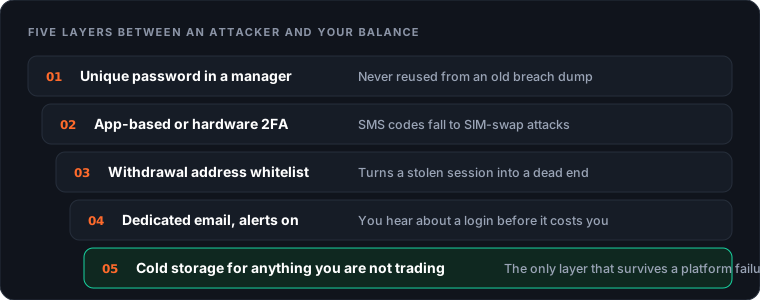
Choose an authenticator app or a hardware security key rather than SMS, and store the recovery codes offline on paper. Do this before depositing, not after.
-
Complete identity verification in one sitting
Have a valid government ID and a recent proof of address ready, and make sure the name matches your bank details exactly. Mismatched names are the most common cause of a stalled review.
-
Whitelist a withdrawal address and run a test transfer
Before funding the account properly, confirm the whole round trip with a small amount so you know the real timings and fees.
Two-factor authentication, ranked honestly
Not all second factors are equal, and the gap between the best and the worst is enormous. If you change one thing after reading this page, change this.
Hardware security key — best
A physical key using FIDO2/WebAuthn cannot be phished, because the browser cryptographically binds the login to the real domain. A perfect clone of the login page simply fails to produce a valid response. Nothing else in this list has that property.
Authenticator app — good
Time-based codes generated on your device. Strong against SIM swaps and password leaks; still phishable, because you can be tricked into typing a live code into a fake page. Enable a cloud backup only if that backup is itself protected by strong two-factor authentication.
Email codes — weak
Your email account becomes the single point of failure. Acceptable as a secondary alert channel, poor as a primary factor.
SMS — avoid
A SIM swap is a social-engineering call to a mobile carrier, not a technical exploit, and it defeats SMS two-factor completely. Where a platform forces SMS, treat the account as one you keep minimal funds in.
Print them or write them down and keep them somewhere physical. A screenshot in your phone gallery is not a backup — it is a copy that syncs to a cloud account an attacker may already be reading.
The email account almost nobody protects properly
Every recovery path on every platform eventually routes through your inbox. Password resets land there. Security notifications land there. Withdrawal confirmations land there. An attacker who owns your email does not need to break the exchange at all — they can simply ask it politely to let them back in.
Despite that, the mailbox is usually the weakest link in the chain: an address created a decade ago, protected by a password that has appeared in three breach dumps, with SMS recovery pointing at a phone number the attacker can social-engineer away from your carrier in an afternoon.
Fixing it takes ten minutes. Give the email account a unique password from a manager and its own hardware-key or app-based second factor. Remove SMS as a recovery method if the provider allows it. Check the account's forwarding rules and filters — a favourite persistence trick is to add a silent rule that forwards anything containing "verification" or "withdrawal" and marks it read, so the victim never sees the alerts that would have warned them.
Then consider using a separate address for financial accounts entirely. It is not paranoia; it is compartmentalisation. A leak from a shopping site, a forum or a newsletter no longer tells anyone where your money lives.
Once you are in: five minutes of housekeeping
Open the security section and read it rather than skimming. Check the active sessions list and revoke anything you do not recognise. Check API keys — an old integration with withdrawal permission is a live risk you forgot about. Confirm the withdrawal whitelist still contains only addresses you control. Turn on every notification the platform offers for logins, withdrawals and security changes; alert fatigue is a smaller problem than silence.
Finally, decide how much belongs on the platform at all. Collateral you are actively trading: fine. Everything else: move it. Our exit-planning guide covers doing that calmly, well before a headline makes everybody try at once.
Account policies, verification tiers and supported second factors are defined by the operator and can change. The authoritative source is bitmex.com.
No verification loop
Get verified once and start with a clean withdrawal path
If identity checks keep bouncing because of where you live, that is a licensing decision rather than a document problem. A platform licensed in your region will verify you in minutes and let you withdraw to your own wallet from day one.
Check verification in your country
External link, opens in a new tab.
Frequently asked questions
Why does my BitMEX login say the credentials are invalid when they are correct?
In order of likelihood: you are on a lookalike domain that accepts anything you type; caps lock or an autofill entry saved from a different site; the account email is a different address than you remember; or the account is locked after repeated failed attempts. Check the address bar first — that single look resolves more cases than any password reset.
I lost my phone and my two-factor codes. Can I still get in?
Only through the recovery codes you saved at setup, or through the operator’s formal account-recovery process, which requires re-verifying identity and takes days rather than minutes. There is no shortcut, and anyone offering one in a chat group is running a scam.
How long does verification take after sign-up?
Automated checks usually clear in minutes. Manual review takes longer and is triggered by name mismatches, poor document scans, a residence in a restricted region, or an address that does not match the proof supplied. Current requirements are published on the official site.
Can I have two accounts?
Almost all regulated and semi-regulated venues prohibit duplicate accounts for one identity, and detection is routine. A second account created to work around a restriction is the fastest way to have both frozen with funds inside.
Is it safe to stay logged in on the mobile app?
Reasonably, provided the device has a screen lock, the app’s own biometric lock is enabled, and a withdrawal whitelist is active. The whitelist is what converts a stolen unlocked phone from a disaster into an inconvenience.
Why was I logged out of every device at once?
Session invalidation follows a password change, a 2FA change, a security-policy update by the operator, or a login from an unrecognised location. If you did none of those things, treat it as an intrusion signal: reset the password from a clean device, revoke API keys, and check the withdrawal whitelist for entries you did not add.
Next step
Installing the app safely
Spot a cloned client before it ever sees your password.
Keep reading →How to place your first trade
Margin, leverage, order types and the funding cost nobody mentions.
Keep reading →Shutdown rumours and exit planning
How to move funds out before everyone else tries to.
Keep reading →